Digital Accessibility for Local Government
Accessibility requirements are technical. Making sense of them shouldn't be.
MunicipalReady helps local governments identify, remediate and reduce digital accessibility barriers across websites, documents, forms and everyday online content.
Why Accessibility Matters
This is about more than meeting a requirement.
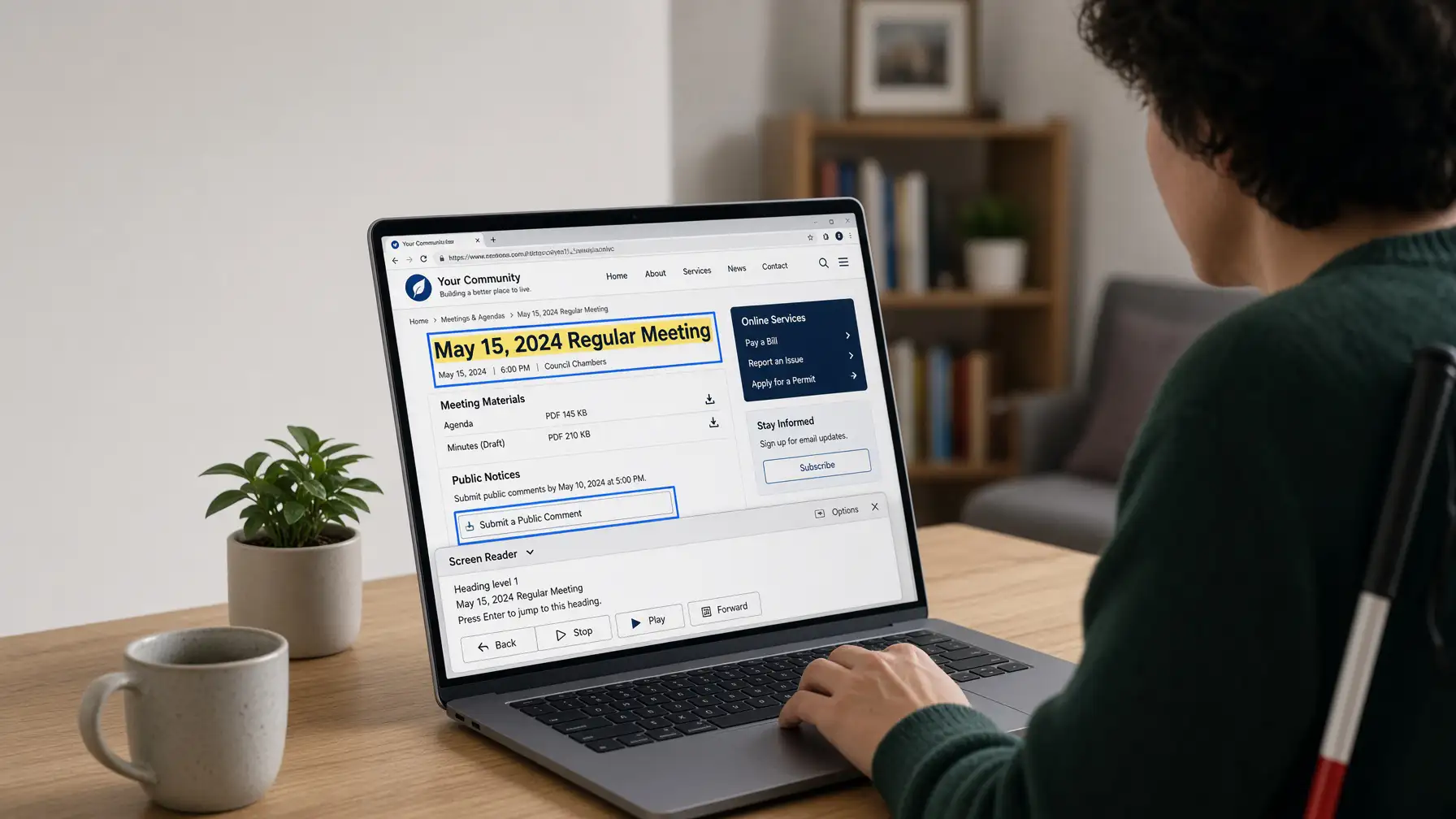
Your municipal website is how people find meetings, understand elections, complete forms, read public notices, access services and stay connected to their local government.
For many public entities, digital accessibility is now tied to specific federal requirements and deadlines. But accessibility shouldn't matter only because a rule says it does. Residents should be able to get public information and use municipal services regardless of how they access the web.
When a website, document or online form creates an accessibility barrier, some residents may have difficulty getting the same information or completing the same tasks.
Good digital accessibility helps make information easier to find, understand and use — while giving municipal staff a better foundation for managing content over time.
The goal isn't perfection overnight. It's understanding what needs attention, setting priorities and building accessibility into the way your municipality works online.
WCAG 2.1 AA — In Plain English
The standard is technical. The idea isn't.
WCAG is a set of guidelines for making digital information more accessible to people with disabilities and to people who navigate, read or interact with online content in different ways.
For a municipality, that translates into practical questions about the website, documents, forms and digital information residents use every day.
Seeing the Information
Can someone see and understand the content?
Text needs enough contrast to be readable. Important information shouldn't depend on color alone, and meaningful images need useful text alternatives when appropriate.
Think: text contrast · readable type · image alternatives · information that doesn't rely only on color
Using the Website
Can someone use it without a mouse?
Navigation, menus, buttons, forms and other interactive features should work with a keyboard — and people need to be able to tell where their keyboard focus is.
Think: menus · buttons · keyboard navigation · visible focus · interactive features
Understanding the Page
Is the information organized clearly?
Pages should use meaningful headings, descriptive links, clear instructions and a logical structure so people can understand where they are and find what they need.
Think: headings · descriptive links · instructions · page titles · logical reading order
Assistive Technology
Can a screen reader make sense of it?
What a page looks like is only part of accessibility. The underlying structure needs to correctly identify headings, lists, links, buttons, form fields, tables and other content.
Think: semantic headings · lists · buttons · labels · tables · meaningful structure
Forms & Services
Can someone successfully complete the form?
Form fields need meaningful labels and instructions. When something goes wrong, error messages should help the person understand what needs to be corrected.
Think: field labels · instructions · error messages · required fields · keyboard access
Documents & PDFs
Can someone access the document, too?
Putting a PDF online doesn't automatically make it accessible. Agendas, minutes, ordinances, applications and other documents may need proper structure and remediation.
Think: headings · reading order · tables · form fields · image alternatives · document structure
Different Screens & Sizes
Does it still work when someone enlarges it?
People may enlarge text or zoom significantly to read content. The website should remain usable without important information becoming hidden or difficult to navigate.
Think: text resizing · zoom · responsive layouts · mobile use · content that reflows
Video & Audio
Is important media information available another way?
Depending on the content, video and audio may need accessibility features such as captions, transcripts or other alternatives so important information isn't available through only one format.
Think: captions · transcripts · audio content · video content · accessible alternatives
The MunicipalReady Approach
You don't need to memorize WCAG.
That's our job. MunicipalReady helps translate technical accessibility requirements into practical improvements to the websites, documents and online services your municipality uses every day.
See What Website Accessibility InvolvesWebsite Accessibility
Accessibility has to work throughout the website.
An accessible municipal website isn't created by installing a widget or checking a single setting. Accessibility involves how the website is designed, structured, written and maintained.
What We Look At
We look at how the whole website works.
Accessibility problems can exist in the design people see, the code underneath it, the way content is organized, or the tools residents use to interact with the municipality.
Headings, lists, tables, page titles and reading order should give content a meaningful structure.
Menus, links, buttons and interactive features should be usable without requiring a mouse.
Text, controls and important visual information need to remain clear and readable for different users.
Links should make sense, controls should be identifiable, and meaningful images should have appropriate alternatives.
The website should remain usable as content is enlarged and across different screen sizes and devices.
Accessibility isn't a plugin.
It's part of how the website is built.
MunicipalReady designs and tests new municipal websites with accessibility in mind from the beginning. For existing websites, we can identify barriers, prioritize improvements and remediate issues toward WCAG 2.1 Level AA requirements.
Talk About Your WebsiteDocuments & PDFs
Your website can be accessible while the documents on it are not.
Municipal websites are full of documents — agendas, minutes, meeting packets, ordinances, applications, notices, reports and public records. Those files are part of the digital experience, too.
Posting a PDF on an accessible website doesn't automatically make the PDF accessible. The document itself may need better structure, review or remediation so people using assistive technology can understand and navigate it.
Common Municipal Documents
Documents You Already Have
Prioritize what needs attention.
MunicipalReady can help identify accessibility issues in existing PDFs and digital documents, prioritize which files deserve attention, and remediate selected documents when that work is included in scope.
That does not mean every file in a years-old archive is automatically remediated as part of a website project. We can help identify important documents, current materials and recurring content so the work can be prioritized in a practical order. Large historical libraries can be evaluated and scoped separately.
Documents Going Forward
Build a better publishing process.
Addressing priority issues helps with today's problems. Better document practices help keep the same problems from being recreated tomorrow.
We can help municipalities develop more accessible templates and practical publishing workflows for the documents staff creates and posts again and again.
The Practical Goal
Prioritize what's there. Improve what comes next.
Document accessibility doesn't have to become another overwhelming project for municipal staff. Start with what matters, improve the recurring workflow, and make steady progress from there.
Explore Documents & FormsAccessible Forms & Online Services
Putting a form online should make things easier.
Residents shouldn't have to print a PDF, find a pen, scan the completed form and figure out where to send it just to complete a routine municipal task.
Well-designed online forms can make services easier to use while giving municipal staff cleaner, more consistent information to work with.
Example Resident Service
Zoning Inquiry
Required fields are identified in text. Instructions appear before submission.
More Than Moving Paper Online
The form has to work for the person using it.
A digital form can still create barriers if fields aren't labeled correctly, instructions are unclear, errors are hard to understand, or the form can't be completed with a keyboard or assistive technology.
People should understand what information is being requested and what they need to do next.
Fields, choices and buttons should be reachable and usable without requiring a mouse.
When something is missing or entered incorrectly, the form should clearly explain what needs attention.
Related questions, required fields and instructions should make sense visually and to assistive technology.
Residents should know when their submission was successful and what happens next.
A Better Workflow
Some paper forms belong online.
From a phone, tablet or computer.
No printing, scanning or deciphering handwriting.
In a more consistent format for follow-up.
Practical Municipal Uses
Start with the forms residents use again and again.
Not every document needs to become an online form. The best opportunities are usually recurring processes where a digital workflow makes the experience simpler for both residents and staff.
Better for Residents. Better for Staff.
Accessibility can improve the process for everyone.
MunicipalReady can help evaluate existing online forms, improve accessibility and usability, and identify paper-based processes that may be better served by an accessible online form.
Explore Documents & FormsTesting, Remediation & Ongoing Accessibility
Accessibility isn't something you check once and forget.
Municipal websites keep changing. New pages are published, documents are posted, forms are updated and information moves as the needs of the community change.
That's why accessibility works best as an ongoing process: review what's there, fix barriers, establish better practices and keep paying attention.
A Practical Process
Find the barriers. Then make a plan.
Accessibility testing shouldn't end with a giant technical report that leaves municipal staff wondering what to do next.
MunicipalReady helps turn accessibility findings into practical work — identifying issues, understanding their impact, setting priorities and addressing barriers that need attention.
Understand the issue. Know what isn't working and why it matters.
Set priorities. Focus first on barriers affecting important information, services and common resident tasks.
Make improvements. Remediate the website, content, documents or forms that need attention.
Keep paying attention. Review new content and changes so accessibility remains part of the website over time.
How We Look at Accessibility
Automated testing helps. Human review matters, too.
Accessibility tools can identify many technical problems, but automated testing alone can't determine whether every page, document or interaction actually makes sense to a person using it.
Automated
Technical Testing
Automated tools can help identify patterns and technical accessibility issues across a website.
Manual
Human Review
Manual review helps evaluate structure, navigation, keyboard use, content and interactions that automated tools can't fully understand.
Why Ongoing Matters
The website you review today won't stay exactly the same.
The MunicipalReady Approach
Make progress. Then keep moving forward.
We help municipalities design, test, remediate and maintain digital content toward WCAG 2.1 Level AA requirements — without pretending accessibility is a one-time checkbox or promising a permanent state of compliance.
Talk About AccessibilityStart Where You Are
You don't have to understand WCAG to start improving accessibility.
Tell us about your municipality, your website and what you're concerned about. We'll help you understand what deserves attention and what a practical next step could look like.
Already know you have accessibility issues? Not sure where to begin? Either is fine.
Request a Website Review You don't need to know the technical details.